|
|
|
Hello, and welcome!
Thank you for helping me test ShareToCal! It's an app for saving things you find on your phone – a video, an article, something to buy – neatly into folders, with a reminder when you want one. You can find out more at sharetocal.com.
The app isn't in the App Store yet, so you'll install it through Apple's free testing app, TestFlight. It only takes a few minutes.
|
|
1 INSTALL THE APP
ShareToCal needs iOS 16.4 or later (Settings → General → About shows yours). On your iPhone (not a computer), tap this button:
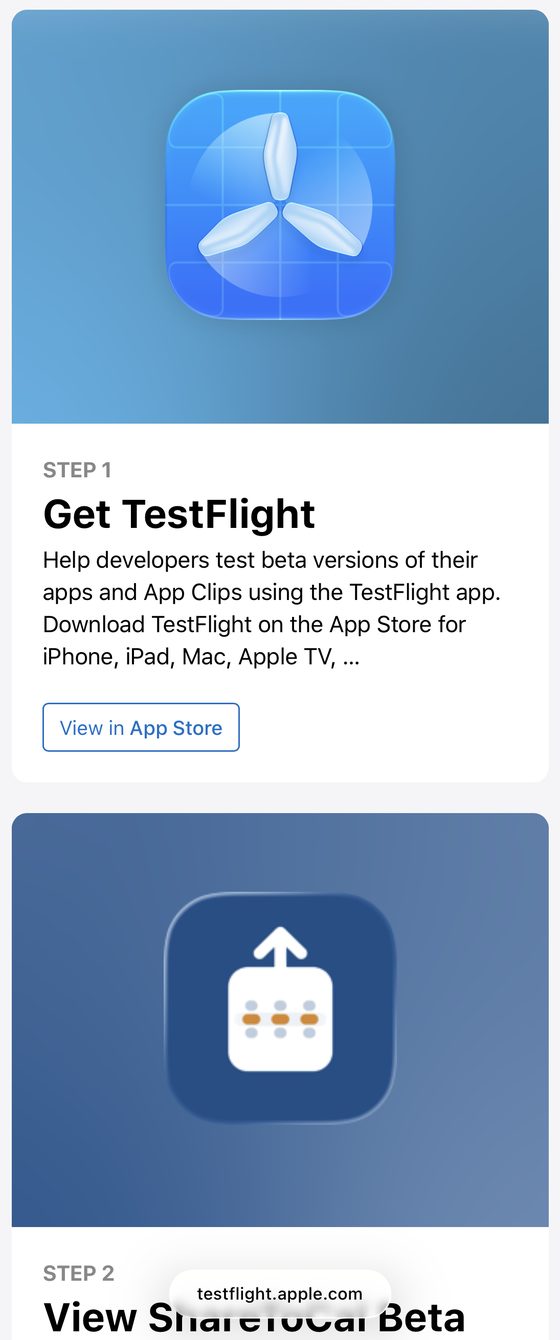
You'll see a page from Apple like this one:
|
|
- Under Step 1 – Get TestFlight, tap View in App Store and install TestFlight (the blue propeller icon).
- Come back to this page and tap the button again. Scroll down to Step 2 – View ShareToCal Beta and tap its button.
- TestFlight opens. Tap Accept, then Install.
|
|
2 GET STARTED
- Open ShareToCal and tap Get started. No sign-up needed – you can start saving straight away.
- It then offers a quick try: tap Try it now and follow the sample page. You can try it again any time from Settings → Try a sample share.
- Worth doing once you've tried it: open Settings and tap Add email. We'll email you a code, then you choose a password.
This keeps your list safe if you change or lose your phone, and lets you use ShareToCal on your other devices. Nothing after a couple of minutes? Check your junk or spam folder.
|
|
3 TRY IT OUT
- Open YouTube (or any app), find something you'd like to watch later and tap Share.
- The first time, you may need to scroll to the end of the row of apps and tap More to find ShareToCal. You can add it to your favourites there so it's always easy to find. Watch how (30 seconds)
- Choose ShareToCal, check the folder it suggests and tap Save – that's it. Want a nudge later? Tap Remind me first; the first time, allow notifications so the reminder can reach you.
|
Good to know
• Once installed, ShareToCal sits on your home screen like any other app.
• When an update is released, TestFlight lets you know. Just tap Update.
• Already have a ShareToCal account? Tap I already have an account on the first screen instead.
|
|
|
If anything is confusing or doesn't work, email me at support@sharetocal.com – a screenshot helps a lot. There are no silly questions; that's exactly what testing is for.
Thanks again,
Adam
|